WARNING AND NOTICE

All tricks in this blog are only for educational purpose. Learn these tricks only for your knowledge. Please donot try these to harm any one. We will not take any responsibility in any case. All softwares and tools on this site are here for private purposes only and If you want to use a software for business purpose, please purchase it. I do not host many of these tools. I Post links that I have found from numerous Search engines. I will not be responsible for any of harm you will do by using these tools.

Readmore

Showing posts with label Virus. Show all posts

Friday, July 22, 2011

what is dumprep.exe process ? Is dumprep.exe any virus or worm ?

Dumprep.exe is a Microsoft process that runs when a program has a critical error and cannot be restored. Basically it comes with XP/PRO. It's a non-essential program but I'm not sure how to stop it from running. I would search microsoft.com until you find information on it or a simple google.com search might yield better results.


Saturday, June 25, 2011

related question already asked. Easiest way to remove fake System Smart Security malware spyware

So you have just visited any site and ended with a popup stating with the following messages from System Smart Security….
Warning! Identity theft attempt detected
Hidden connection IP: 128.154.26.11
Target: Microsoft Corporation keys
Warning
Warning! Virus detected
System warning
No real-time malware, spyware and virus protection was
found. Click here to activate.

[VIDEO] - Stuxnet: Anatomy Of A Computer Virus


Wednesday, June 1, 2011

0
Delete Autorun.inf Virus without any Software!

There are Numerous softwares available that exclusively deal with Autorun.inf and other Autorun viruses, for example ‘USB Disk Security‘. But Inspite of installing such kind of software, Sometimes you might accidentally open your USB disk Drive (Pen-drive) without looking at the warning by your Antivirus Software and thus Affecting your System with Autorun.inf virus. Once Autorun.inf gets control on your System, it will repeatedly Block any USB Scanning Software preventing it from deleting. It also Restricts you from opening hard drives on a double click.
In such cases, the Traditional Method of deleting Suspicious Programs Using Command Prompt is quite Useful. So Lets start with the Steps:
# 1. Open command prompt. Go to start > Run, and type “cmd” . Press enter.
# 2. Type “cd\” and press enter to get to the root directory of your System.
# 3. Type “attrib -h -r -s autorun.inf” and press enter. This will look for autorun.inf in the selected Drive.
# 4. Type “del autorun.inf” and press enter. This will delete autorun.inf virus from the selected Drive.
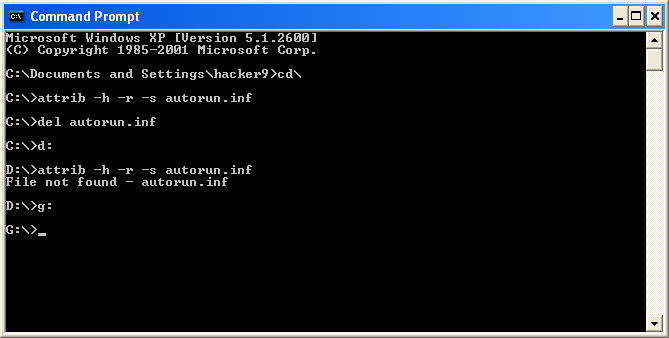
How to Delete Autorun.inf Virus from pendrive without any Software

Friday, May 27, 2011

0
The Evolution of Malware and Information Security

Despite years of investment and research by the security industry, malware continues to play a significant role in the theft of sensitive data. In fact, according to a recent report from the Verizon Business Risk Team, malware was present in around 80% of breaches.
So, if malware presents such an obvious risk in data breaches, why haven’t security organizations done something to prevent its use?

The fact is that traditional approaches to stopping malware, such as relying on signature-based anti-virus, no longer provide sufficient protection. It’s too easy for malware authors to write code that is able to avoid detection and operate successfully well below the anti-virus radar. Attackers can modify existing malware slightly, add new functionality where needed, and enhance their ability to avoid detection with little effort using readily available tools......