All tricks in this blog are only for educational purpose. Learn these tricks only for your knowledge. Please donot try these to harm any one. We will not take any responsibility in any case. All softwares and tools on this site are here for private purposes only and If you want to use a software for business purpose, please purchase it. I do not host many of these tools. I Post links that I have found from numerous Search engines. I will not be responsible for any of harm you will do by using these tools.
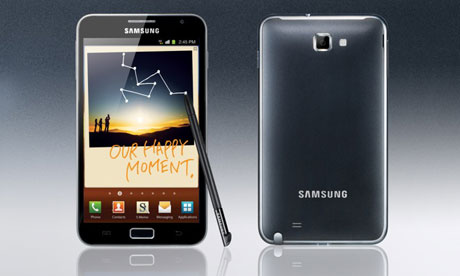
Now today launching a GALAXY next series "Samsung GALAXY Note".The amazing thing is that it's provide freedom from multiple devices and you can catch the live webcast of the Samsung Galaxy Note and also chance to win too by participating simple contest.we provide below a link of contest page.participate it & get chance to win "Samsung GALAXY Note".Its launch on 2nd November,2011 at 12.30 pm to 1.30 pm.
This could be the smartest move by Nokia who finally decided to get rid of Symbian in their N Series smartphones to focus and drive Meego (Which seems will be spectacular) , the operating system was born from the merging of Moblin of Intel and Maemo of Nokia.
This would make the Nokia N8 the last device in Symbian series.
The news comes hand in hand from Doug Dawson representing the brand told Reuters. In addition, according to Slashgear, the first mobile phone N Series with Meego will Nokia N9 Similar to N8 but with a physical keyboard and other improvements.
Nokia has had severe problems to compete adequately in the field of smart phones, as being far outweighed by product Apple with iPhone and Google with Android. The Finns held a foolish position that ended up being highly damaging to includes an operating system that seems made in 2001 in your apparent quality as the N95, N96 or N97. In fact, if review our recent review of these two phones will notice that the main problem with these devices is not the hardware, terrible software is included.
We will see how to install Meego OS in new smartphones. For those with a N900 in their hands, There is a way to install Meego Operating System on Nokia N900, but not simple .
Java technology brings numerous applications to low end handsets but still they are somewhat restricted. It is not only due to the comfort and ease of work that symbian’s provide but also due to its robustness in application support. There are tons of applications that provide solutions to varies problems and needs for symbian users.

But for a user who needs basic functionality of a phone goes for a Java based mobile handset, due to its cost effectiveness. Java based phones also have various applications that can fulfill basic needs such as music players, zip unzip applications, social networking applications, web browsers etc. But the quality of service differs a lot from high end symbian phones. One such field where Java handset users may feel this gap is while trying to view streaming online videos on their phones. But now with Bolt Browser this issue can be easily solved.
Bolt Browser is a Mobile Web Browser available for java based handsets. Some of the features that makes it useful are:
Well these features are good enough to make it a must have application for java handset users who are in constant search of newly released videos from their favorite video streaming site and love to remain connected and tweet every update on the way. Other good browsers for java platform are Opera Mini and UCWEB. Bolt supports flash which still opera Mini do not have.
Download Bolt Browser 2.1
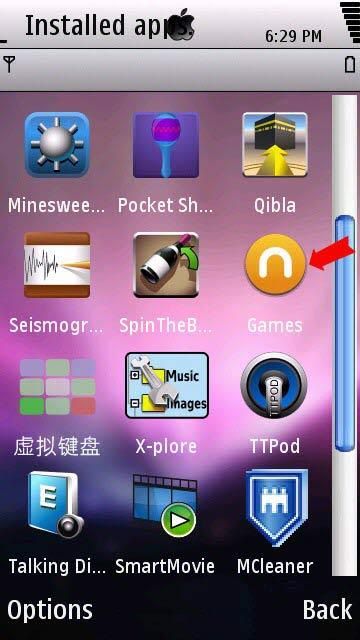
Nokia N-Gage gaming is one of the most popular gaming environment that Symbian game lovers would always want. It was rather S60v3 which got full support from Nokia for N-Gage gaming. But With the evolution of touch screen phones, the S60V5 models only a few like the N97 got official N-Gage gaming support from Nokia. This Might be a bit disappointing fact for game lovers as most of the people now are possessing a touch screen phone and as a matter of fact there are very few good quality games in S60v5.

The reason for N-Gage not supporting touch screen phones are their requirement to have a physical keypad. V5 models available nowadays do not have that. Specially the ones that are commonly used such as 5800XM, 5230, 5233, 5235 etc. But now there is a way to Install N-Gage and play those games that you always wanted to. Here is a step by step guide on how to do this.

As N-Gage games require keyboard support and we do not have that in our phones then the best and only option left is to emulate it. So we will use virtual Keyboard for this purpose. This installer will work on all S60V5 phones though on the download page it is written as virtual keyboard for 5800.
Once the virtual keyboard is installed there are few settings that you need to do with it.
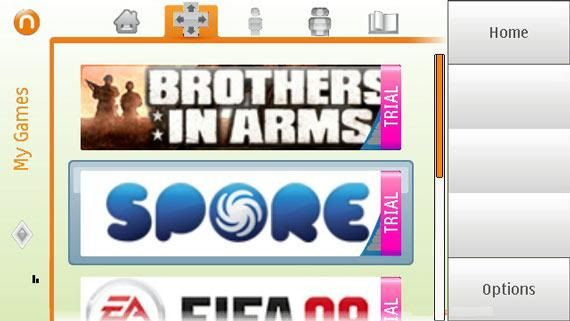
You can visit N-Gage official website to download some trial games. Remember, not all games are compatible so download only for N97. Few games that I was successfully able to play are FIFA 2008, 2009, Asphault4 and Spores. Now there are 2ways in which you can install.
Note: Keep the RomPatcher patches enabled while installing the games, else the games will not be installed and exit with an error.
First thing you should do before running the N-Gage application is to disable Rompatcher patches else this may be one of the reasons for the game to exit with a KERN EXEC 3 error. Now follow the steps.
Well, truly speaking there are many problems that you face while playing games on N-Gage. I have tried dozens of games but out of them only few worked well. KERN EXEC 3 is such an error that you will find while trying to start most of the games. For testing purpose I have tried cracked version of a game that did not run and exited giving error, but the trial version of same game downloaded from official site worked smoothly.
There is also an annoying problem with the Virtual Keyboard. Key pressed once in one direction tends to be kept pressed in that direction only, this is a real trouble while playing Asphault4, FIFA and specially Spores. In FIFA you will find yourself at key shortage, though the game runs fine. Some times even if the patches are enabled the game fails to install. There are times when the application runs out of memory and hence stops giving a warning message to close some of the applications first. In this situation I will recommend you to have a task manager at hand like the Handy Task Manager.
Note: Please DO NOT ask for links to cracked games here. These can be found easily by doing a simple Google search.
Hello Friends………….
As Iphone 4.0 is around the corner courtesy Airtel and Vodafone Service Providers we will soon see it in india.
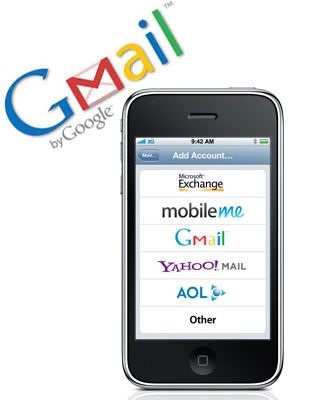
While we wait for it.. let me go ahead and show you how we can configure our Iphone to PULL emails from out Mail Provider.

As i used to wonder will it be possible someday that i can see and send my friends using my gmail from my Phone. So here we go..
Now after this we need to follow few more steps to make it working perfectly.
We are ready to go..
For any help please go through the Video below.
http://www.youtube.com/watch?v=gd37Edi0Phc
SmartTouch is an application which allows you to control your computer through your phone via Bluetooth. You just need a computer with Bluetooth and a S60 5th Edition phone and you are all ready to go. Here’s how you can do it following simple steps

This is perhaps the first of its kind program for a platform with a touchscreen. You can control the computer in 3 modes.
In this mode you can control any player on your computer. You can see a music player like layout with buttons like “play / pause”, “next”, “prev”, “mute” and volume keys. This is very helpful if your away from your PC or laptop other some work and the music is playing.
This mode has keys like “Up”, “Down”, “Left”, “Right”, “Esc” and “Enter”. These can be used for controls in a games, but still does not work with all games as limited key and no customization.
Similar to a touchpad (also trackpad) of a laptop you can control the mouse of the computer to which you are connected. This is great while surfing the Internet or as a pointer and pen during presentations.
Tested Successfully On: Nokia 5800 Music Express
Have you ever been away from your desktop and needed some information that was on it? Have you ever needed to shutdown your computer or do something underhanded while away? What did you do? Run home?
Well, this is a much better solution! Our solution comes installed on most Windows Mobile Devices with touch-screens but some carriers cheaped out and did not include it. For those devices, you can still grab the remote desktop client from here.
Remote desktop can be found on your Start Menu and it looks like this:

Once you open the Remote Desktop application, you will see a screen asking you for your connection information. If you have ever used Remote Desktop from your computer, it is very similar. You will need to know your username, password and your domain. You will also have to make sure that port 3389 is opened and mapped to your desktop that you want to connect to. If you are unsure of how to do this, you can check out this web site on port forwarding.
Once you have the prerequisites worked out, you just need to launch the application from your phone and fill in the details.

You can see from the screenshot above that I obscured my information so you hackers out there don’t decide to DOS my servers! But after you fill in your computer name, username, password and domain you have the option to select the check box to save your password.
Then, you can hit the Options button and see what your options are…

You can choose either 256 colors for a faster experience or 16-bit colors for a truer desktop-like experience. You may also select for the remote desktop to run full resolution on your device or have the remote screen scaled down to fit your mobile device’s screen.

You can also map your storage to the remote machine as well as play sounds on your device or on the local computer. You can also disable the sound all together. Try the options out and see which combination works best for you.
When you are done tweaking, we are ready to give our remote connection a try! Are you ready?

And just like that…

We have our desktop on our mobile devices, and we can do whatever it is we needed to do – just as if we were sitting in front of the machine! In other word, I have full control over PC from Windows Mobile phone. So, I can open up files, start a downloading a torrent or control my music! This is simply awesome and seeming it is already installed on your device – you should give it a try today!
Today, with the use of some simple, free tools we often use and love, we’ll show you to create an automated mobile printing queue. Best of all? It costs nothing, except for your your carrier’s internet costs.
You’ve probably heard all about Dropbox by now. If you haven’t, it’s about time. Dropbox can be best described as a folder in the cloud. This means you can access this same folder on your desktop computer, your laptop and your cellphone. It’s a great way to share documents and photos across computers.

Dropbox plays a central part in this mobile printing tutorial. Make sure to install it on a computer that’s connected to your printer.
If you’re using Mac OS X, create a folder called Print in your Dropbox folder, with two sub-foldersPrintQueue and Log. Folders like these will be created automatically using the Windows routine.
This is not nearly as difficult as it sounds. You can download this zip file containing a VBA script from Digital Inspiration. Double-clicking this file will put the aforementioned PrintQueue and Log files directly in your Dropbox folder and set up a printing queue. You can skip ahead to step three.
If you’re using Mac OS X, it takes a bit more effort on your side. We have Bbedell to thank for this workaround, which was originally posted in the comment section at Lifehacker.
Fire up the Automator application and choose to create a Folder Action. Type “printer” in the search field and drag “Print Finder Items” to the main window pane. Type “Trash” in the search field and drag the “Move Finder Items to Trash” to the main window pane.
Alternatively, if you want to keep the files after they’re printed, use the “Move Finder Items”workflow, to Dropbox -> Print -> Logs.

Finally, make sure to set Folder Action receives files and folders added to the PrintQueue folder you created earlier on. Save the workflow and give it a name. That’s all!
To print a file, all you need to do is move a file on your phone to the PrintQueue folder. If your computer is turned on and connected to a printer, it’ll finish the job. On newer smartphone models, you can use the native Dropbox application, available for iPhone, iPad, Android,BlackBerry, Nokia and Palm.

If you are using OTA files then there won’t be much trouble installing it as you can use your Blackberry Desktop Software for such files but if you are using non-OTA files then the procedure is little different. Follow the simple steps given below to install .jar files in your blackberry phone. This method works for all Blackberry Bold models and few other models.
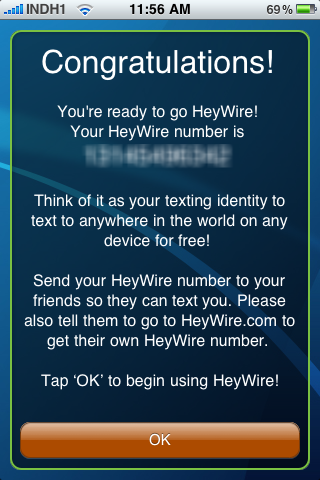
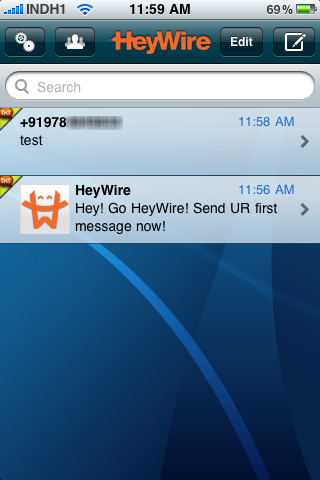
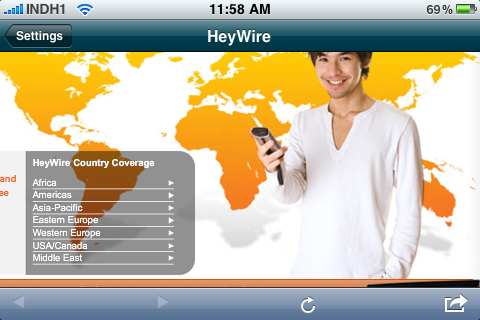
Everybody loves free stuff and for today's cellphone centric society having a free international SMS texting service would definitely come-in handy. New service Heywire does exactly this and even allots you a REAL phone number allowing users to send and receive free text messages internationally, currently supporting free SMS messages to 114 countries through 360 mobile operators with plans to expand network to 193 countries and 850 mobile operators by end of this year. Heywire is currently available for iPhone, iPod, iPad, PC, and Mac with Android, Google TV, Blackberry and Online portal support launching soon.
Heywire can be downloaded from official website at - http://www.heywire.com/.
Unlocking any device means altering the system software in some way so that the device can be allowed to do something that it normally could not. Unlocking the iPhone is primarily done to allow the user to use the phone with a carrier other than AT&T wireless
You can unlock iphone easily with this software.Unlock iPhone software is GUARANTEED to unlock and/or jailbreak your iPhone 4, 3G and 3GS iPhone . iphone unlocking software works with all iphones including iPhone 4, iPhone 3G and iPhone 3GS that have any firmware version including the latest iOS 4 firmware, along with all previous firmware versions(3.2, 3.1, etc)
Features
1.Use your iPhone 4, iPhone 3G, iPhone 3GS with ANY cellular provider!
2.Jailbreak and Unlock iPhone 4, Unlock iPhone 3G, Unlock iPhone 3GS and any previous iphone!
3.USE VIDEO CHAT ON YOUR 3G AND 3GS IPHONE! (not available anywhere!)
4. LIFETIME Updates and Support
5.LOWEST PRICE IN THE INDUSTRY
And lot more
Click to unlock your iphone
If your mobile supports Java Applications and you are not very much happy with the default browser built in then may be the following mentioned application prove to be the best for you.
Bitstream Bolt is a very simple, mini-version of the Internet, BOLT provides users with a fast, efficient way to enjoy full desktop PC-style web pages, streaming video, and social media applications on all levels of mobile devices. The latest version also support the Muti-tab browsing as we do in these days with the desktop browser. You can also save the Username and password of the frequently visited site to your mobile so that you don’t need to type them every time you browse the web page.
For Vodafone customers:
Dial 111(wait) and u get some offers to be heard,dont keep hearing those offers... press
(9) then (2) and then Again (9) u will be directed to the CUSTOMER CARE EXECUTIVE .
This is for all the states of India
OR
Andhra Pradesh: Call Vodafone Customer Care on 111 (toll free) from your Vodafone mobile phone or on 9885098850 from any phone or email at vodafonecare.ap@vodafone.com
Chennai: Call Vodafone Customer Care on 111 (toll free) from your Vodafone mobile phone or on 9884098840 from any phone or email at vodafonecare.chn@vodafone.com
Delhi & Ncr: Call Vodafone Customer Care on 111 (toll free) from your Vodafone mobile phone or on 9811098110 from any phone or email at vodafonecare.del@vodafone.com
Gujarat: Call Vodafone Customer Care on 111 (toll free) from your Vodafone mobile phone or on 9825098250 from any phone or email at vodafonecare.guj@vodafone.com
Haryana: Call Vodafone Customer Care on 111 (toll free) from your Vodafone mobile phone or on 9813098130 from any phone or email at vodafonecare.har@vodafone.com
Karnataka: Call Vodafone Customer Care on 111 (toll free) from your Vodafone mobile phone or on 9886098860 from any phone or email at vodafonecare.kar@vodafone.com
Kerala: Call Vodafone Customer Care on 111 (toll free) from your Vodafone mobile phone or on 9846098460 from any phone or email at vodafonecare.ker@vodafone.com
Kolkata: Call Vodafone Customer Care on 111 (toll free) from your Vodafone mobile phone or on 9830098300 from any phone or email at vodafonecare.kol@vodafone.com
Maharshtra & Goa: Call Vodafone Customer Care on 111 (toll free) from your Vodafone mobile phone or on 9823098230 (Postpaid) /9923399233 (Prepaid) from any phone or email at vodafonecare.mah@vodafone.com
Mumbai: Call Vodafone Customer Care on 111 (toll free) from your Vodafone mobile phone or on 9820098200 from any phone or email at vodafonecare.mum@vodafone.com
Punjab: Call Vodafone Customer Care on 111 (toll free) from your Vodafone mobile phone or on 9888098880 from any phone or email at vodafonecare.pun@vodafone.com
Rajasthan: Call Vodafone Customer Care on 111 (toll free) from your Vodafone mobile phone or on 9828098280 from any phone or email us at vodafonecare.raj@vodafone.com
Tamil Nadu: Call Vodafone Customer Care on 111 (toll free) from your Vodafone mobile phone or on 9843098430 from any phone or email at vodafonecare.tn@vodafone.com
UP(East): Call Vodafone Customer Care on 111 (toll free) from your Vodafone mobile phone or on 9839098390 from any phone or email us at vodafonecare.upe@vodafone.com
UP(west): Call Vodafone Customer Care on 111 (toll free) from your Vodafone mobile phone or on 9719097190 from any phone or email at vodafonecare.upw@vodafone.com
West Bengal: Call Vodafone Customer Care on 111 (toll free) from your Vodafone mobile phone or on 9732097320 from any phone or email at vodafonecare.wb@vodafone.com
Now you no longer need to rush to the vendor for buying recharge codes, every time your talk time runs out.Just recharge your prepaid mobile online in India.Its a next generation online prepaid recharge solutions.You can easily recharge your mobile online by your credit or debit cards.
For online mobile recharge visit : https://www.rechargeitnow.com
BSNL Users Visit : http://portal.bsnl.in/rc/aspxfiles/login.aspx
Recommended for you
Powered by | Design by Rahul